Shopify theme vs page builder: decide what needs to change
A different campaign page and a different storefront are not the same project.
Start with theme-native editing when the change belongs to your everyday storefront. Consider a page builder when a specific landing-page workflow needs more composition freedom than your theme exposes. A page builder usually works alongside a theme; it is not a replacement for every storefront responsibility.
Separate page scope from storefront scope
A campaign team may need a new landing page every week while the catalogue, navigation and product templates stay stable. Another merchant may need a consistent redesign of those shared areas. Write down the actual surfaces that must change before choosing the tool. Otherwise a solution for one campaign can become an accidental dependency across the entire store.
Shopify exposes sections and blocks through the Theme Editor, but the controls depend on the theme and version. A page-builder app can add its own editing model. PageFly’s official listing, for example, describes a drag-and-drop landing-page builder. This is a category example, not a tested compatibility recommendation or a claim about every builder.
Compare the work, not the category label
| Approach | A sensible fit | What to check |
|---|---|---|
| Theme-native sections | Repeatable catalogue, product and brand layouts | Does the delivered theme expose the controls your team needs? |
| Page-builder app | A specific campaign or landing-page workflow | Plan limits, ongoing costs, theme integration and what remains after removal |
| Custom development | A necessary interaction that existing controls cannot express | Ownership, documentation, maintenance and update testing |
Build one representative page before committing
Give the same brief to each option: one campaign image, one clear promise, a useful product selection and an obvious next step. Then change the image, reorder the content and test the mobile version. Record how many separate interfaces you need to use and whether another team member can repeat the work.
Check shared styling and interactions. A landing page that looks separate from the product and cart experience may need additional design work. Test fonts, button states, navigation, analytics consent and cart behaviour on the actual store. Do not infer performance from a tool’s category: measure the final page with its real media and installed apps.
Calculate avoidable cost without promising savings
Make a list of the jobs handled by your current subscriptions. Mark each as still required, potentially duplicated or uncertain. A theme-native cart presentation might replace a purely visual cart app, but an operational system doing fulfilment or subscription billing is a different responsibility. Compare functions, not similar-sounding feature names.
Include the cost of rebuilding existing pages and checking what happens when an app is removed. Ask the provider for its current plan terms rather than copying a price from an old comparison article. There is no universal monthly saving, and keeping an app may be the right choice when it does an essential job well.
Where Ecomfella fits
Ecomfella is a theme-based approach: the demonstrated sections, product presentation and cart directions belong to one storefront system. The real editor recording shows a Biebers Hero section changing through Shopify controls. It is useful evidence when your goal is a coherent store rather than an unrelated campaign editor.
It is not evidence that you will never need apps or a developer. Compare your required workflow with the actual product tour, then ask about any missing integration before purchase. Core and Complete differ in starting directions and launch help; the package comparison explains those boundaries.
A useful trial brief is a seasonal collection launch. Ask your editor to change the campaign photography, move the product selection and update the supporting explanation without touching the live theme. Then ask a second editor to repeat the change. If only the original builder can maintain the result, include training or documentation in the decision rather than treating visual freedom as the only benefit.
- List which templates must change.
- Trial one real campaign and one product page.
- Check the mobile buying journey after the change.
- Document the removal and update path.
- Choose the smallest maintainable toolset that solves the brief.
See the decision in the real theme
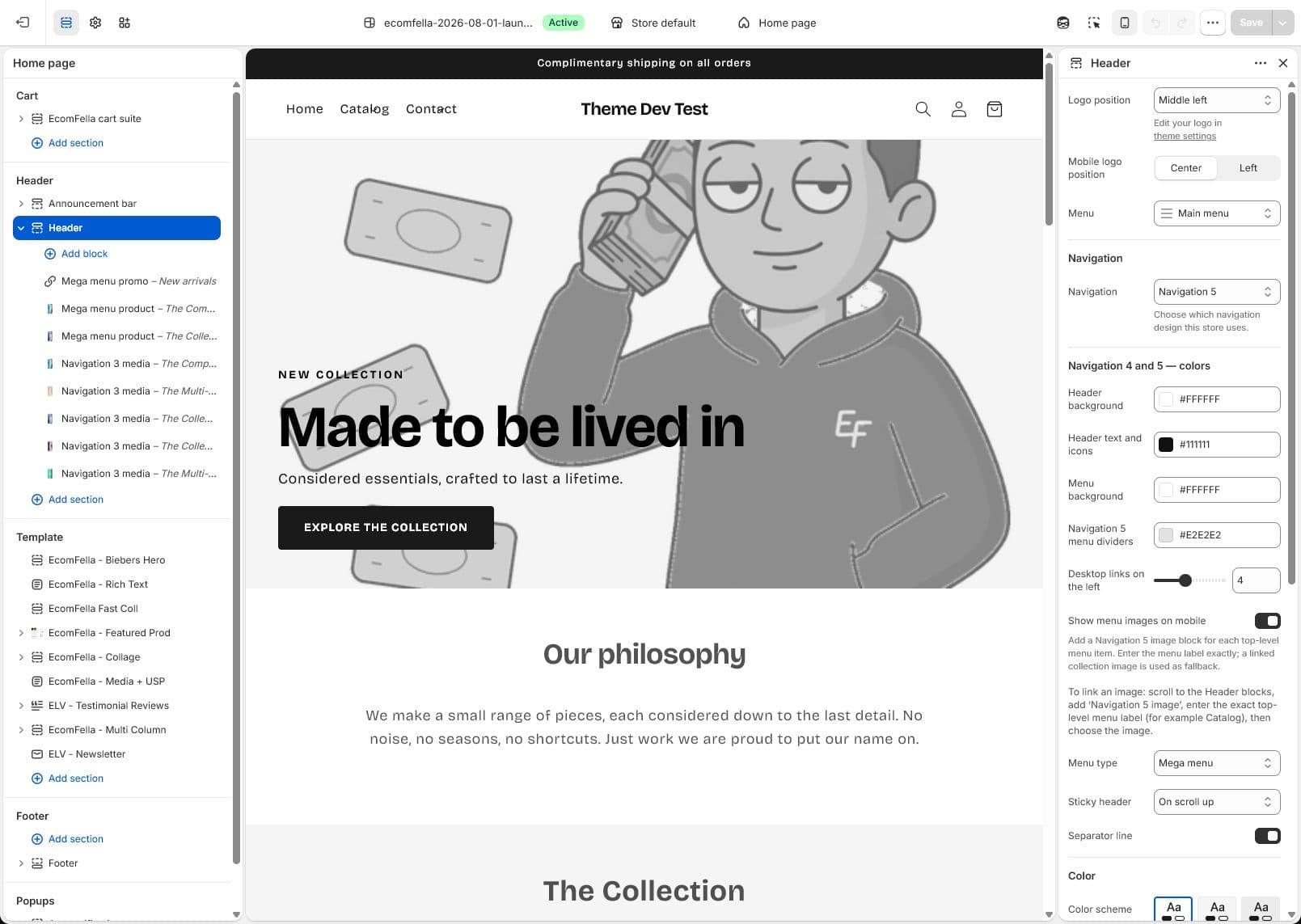
Use the Ecomfella theme overview as the product reference, then inspect the real demo and current package comparison. A guide is not a substitute for checking your own catalogue, release and integrations.
- Installation
- Upload the delivered ZIP as an unpublished Shopify theme. Review before publishing it yourself.
- Store licensing
- One licensed Shopify store per store seat.
- Updates
- Review supported releases in the Buyer Portal. Updates do not automatically overwrite your live theme.
Put the guide next to the product.
Inspect what is included, then decide whether the theme fits your store. Preview content does not open sales or grant account access.
See the Theme Editor in the product tourSources and review
External product details were checked on 2026-09-13. Provider documentation can change. Ecomfella examples use the current marketing evidence library; development files and future products are not a promise of delivery.
- Shopify: sections and blocks, checked 2026-09-13
- PageFly: official Shopify App Store listing, checked 2026-09-13