Dawn vs a premium Shopify theme: when is paying useful?
Dawn is a credible starting point. A paid theme needs to earn its place.
Keep Dawn when it supports your catalogue and your team can build the store you need. Consider a paid theme when its verified layouts, controls or support remove specific work you would otherwise pay to do. A higher price is not evidence of higher sales, better accessibility or a faster store.
Begin with an accurate Dawn baseline
At this review, Shopify lists Dawn as a free theme designed by Shopify. Its official feature list includes product filtering and sorting, product videos, size charts, recommended products and a mega menu. Do not assume a free theme has no useful commerce features. Check the current listing and your installed version, because they can change over time.
This article is not a performance benchmark or an exhaustive compatibility test. We have not measured two identical merchant stores running Dawn and Ecomfella under controlled conditions. No speed score, conversion lift or ranking advantage is claimed here. The comparison is about deciding which work remains for your store.
Use a requirements comparison
| Question | Dawn | A paid theme such as Ecomfella |
|---|---|---|
| Acquisition | Listed as free by Shopify at the review date | Check the current package price and store licence |
| Useful controls | Check the installed version and its editor | Verify the delivered controls; do not rely on a feature count |
| Visual direction | Adapt the existing layouts to your brand | Evaluate whether included directions reduce real setup work |
| Launch help | Check the applicable support channel and scope | Confirm what help is included and what remains your responsibility |
| Store performance | Measure with your products, media and apps | Use the same test content and device conditions |
When staying with Dawn makes sense
Stay when your remaining problems are content problems: unclear photography, missing measurements, confusing categories or an offer nobody understands. A new theme will not produce that information for you. It can expose a better place to present it, but somebody still needs to create and maintain the content.
Also consider staying if you have already tested the product and cart journey successfully and the desired change is small. Define a bounded section change or a modest styling brief before replacing the whole storefront. Include regression testing in that brief so a visual adjustment does not disturb buying behaviour.
When a paid theme can justify the work
A paid theme becomes useful when several important requirements are already implemented together. For example, a product-led brand may prefer one coherent set of navigation, product-information and cart layouts rather than commissioning each separately. Evaluate the exact feature combination, not the word premium.
Ecomfella provides a product tour with real storefront directions, product-page evidence and a Cart Studio. Use those to check the specific gaps in your brief. Core offers self-directed setup; Complete adds the documented launch-help scope. The pricing page is the current reference, not a copied amount in this comparison.
Write a short acceptance brief before spending: which page needs to change, what the merchant must be able to edit and what evidence will count as a working result. For instance, compare the treatment of a long product title, a choice of sizes and a cart containing several items. If both candidates already handle the task well, that task is not a reason to pay for the alternative. Look instead at the remaining work and the help you actually need.
Budget for migration, even when the design is ready
Record your current app integrations, template assignments, analytics configuration and content before changing themes. A preview that looks right on the homepage is not a complete migration test. Rehearse the product, collection and cart tasks and check the pages your customers already reach from search.
Keep the existing live theme as your reference while testing an unpublished candidate. Resolve missing content and integrations before publishing. For Ecomfella, delivery and installation are controlled through the Buyer Portal and an approved store seat; do not assume a Theme Store trial, automatic app installation or an automatic migration service.
- Name the gaps Dawn leaves in your actual brief.
- Verify the alternative solves those gaps in a real demo.
- Include content, apps and migration in the budget.
- Confirm support and licensing before buying.
- Publish only after testing the complete buying journey.
See the decision in the real theme
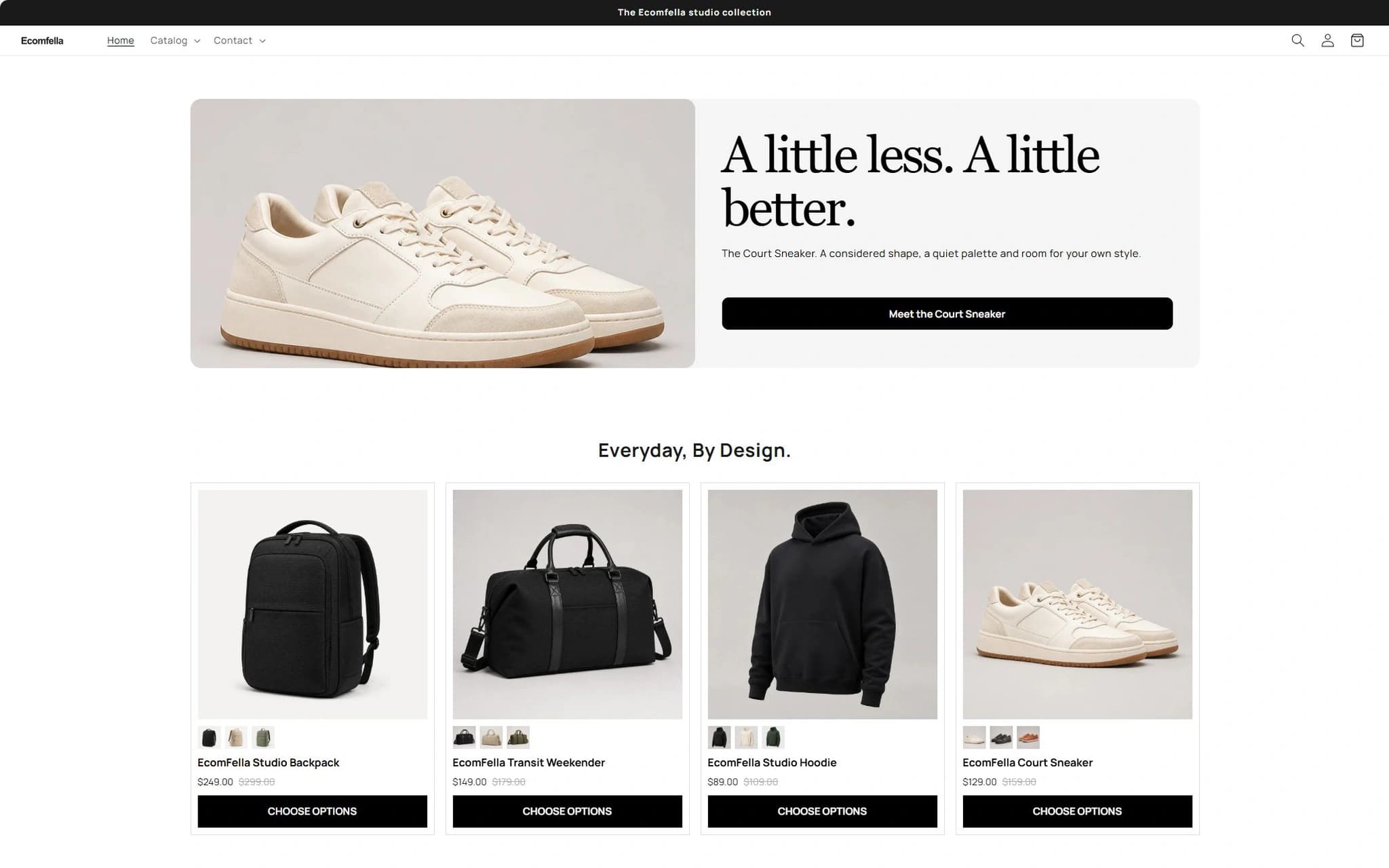
Use the Ecomfella theme overview as the product reference, then inspect the real demo and current package comparison. A guide is not a substitute for checking your own catalogue, release and integrations.
- Installation
- Upload the delivered ZIP as an unpublished Shopify theme. Review before publishing it yourself.
- Store licensing
- One licensed Shopify store per store seat.
- Updates
- Review supported releases in the Buyer Portal. Updates do not automatically overwrite your live theme.
Put the guide next to the product.
Inspect what is included, then decide whether the theme fits your store. Preview content does not open sales or grant account access.
Compare Ecomfella packagesSources and review
External product details were checked on 2026-09-13. Provider documentation can change. Ecomfella examples use the current marketing evidence library; development files and future products are not a promise of delivery.
- Dawn: official Shopify Theme Store listing, checked 2026-09-13
- Shopify: choosing themes, checked 2026-09-13