Move from WooCommerce to Shopify without losing the thread.
Treat migration as a data, operations and URL project before it becomes a design project. Rebuild the presentation in an unpublished Shopify theme, reconcile the records, test the buying path, and move the domain only after a deliberate acceptance review.
- Inventory
- Map
- Import a sample
- Reconcile
- Test
- Approve cutover
Record what the old store actually does
Export a protected backup and inventory products, variants, images, customers, order history, content and indexed URLs. Separate standard WooCommerce data from plugin-owned fields. Subscriptions, memberships, gift cards and custom checkout logic need their own migration decision; copying a product CSV does not recreate them.
Assign an owner and acceptance rule to each data type. Keep personal exports out of shared documents, email attachments and public code repositories. This guide is a planning checklist, not an instruction to upload customer records to Ecomfella. Confirm the lawful handling of those records with your own advisers.
Map records before a bulk import
Create a small representative sample containing simple products, variants, discounted items and unusual shipping requirements. Map identifiers, option names, currency, tax treatment, weights, stock and image associations. Keep a reconciliation ledger outside the storefront so you can distinguish a genuine duplicate from a repeated import.
Shopify recommends importing products before customers and historical orders so relationships can be established. Check which import method supports each data type. Do not assume a WordPress page, customer password or plugin subscription can move unchanged. Plan the supported account-access transition and communicate it at the appropriate time.
| Source | Destination check | Acceptance evidence |
|---|---|---|
| Product + variants | SKU, options, stock, media | Sample counts and manual comparison |
| Category | Collections + menus | Same shopper destinations |
| Custom fields | Typed metafields | Correct values on sample products |
| Indexed URL | New page or redirect | Relevant destination, no chain |
| Plugin workflow | Shopify/app equivalent | Authorised end-to-end test |
Rebuild the storefront separately
A WordPress theme is not a Shopify theme. Use the migration to define reusable product and collection templates rather than attempting to copy every old layout literally. Keep essential product information near the buying action and give customers familiar navigation labels while the visual treatment changes.
Ecomfella can be evaluated as that storefront layer. Its Theme Editor evidence shows actual section controls; it does not perform catalogue imports or transfer plugin data. Installation uses a supported ZIP uploaded as an unpublished theme, followed by review. A package purchase is not a complete platform-migration service.
Make the final switch reversible
Test shipping, tax, payment, notifications and refunds through authorised test flows before launch. Verify redirects from valuable old URLs, mobile search and the cart. Plan a final data sync window so new orders or inventory changes are not missed while the old store remains active.
Only the owner should authorise domain cutover after the acceptance checklist passes. Keep the previous site and exports recoverable, record DNS and rollback responsibilities, and monitor missing pages and order reconciliation afterwards. Search rankings can change during a migration; neither a theme nor a redirect spreadsheet guarantees retention.
- Reconcile product and variant counts.
- Test important old URLs and images.
- Check consent and analytics configuration.
- Confirm order-notification behaviour before historical imports.
- Approve launch and rollback with named owners.
Inspect the real storefront layer
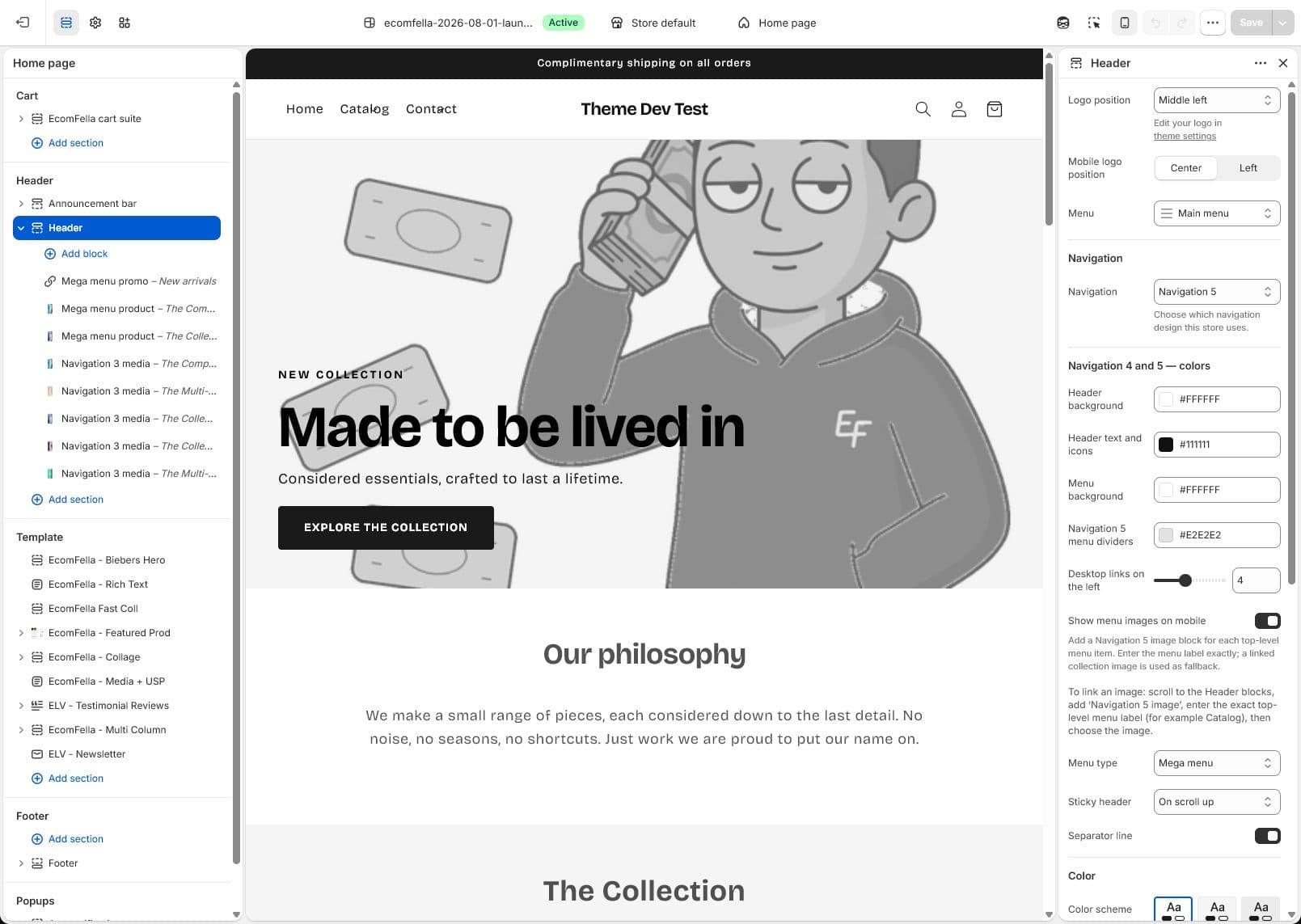
Read the Ecomfella theme overview, inspect the real product demo and use the package comparison to evaluate the remaining work. One licensed Shopify store per store seat. Upload the delivered ZIP as an unpublished Shopify theme. Review before publishing it yourself.
Questions before you decide
Does Ecomfella import WooCommerce data?
No. The theme is the Shopify storefront layer. Select and validate a separate migration method.
Will my existing SEO be preserved automatically?
No. Relevant redirects, content continuity and crawl monitoring reduce avoidable risk, but rankings are not guaranteed.
Bring this checklist to the theme.
See the real layouts and controls before deciding whether they fit your products. No theme purchase or delivery is enabled in this Preview.
Explore the real themeSources and review
Primary provider documentation reviewed on 2026-09-13. Features and policies can change; confirm the selected release and current provider terms. The Ecomfella media comes from the existing unpublished marketing-showcase evidence library.
Continue with the next question
Move to a section-based Shopify theme with a controlled rebuild.
Use Shopify metafields to give each product its own answer.
All storefront guides and tools