Move to a section-based Shopify theme with a controlled rebuild.
An Online Store 2.0 migration changes the presentation architecture, not just the colours. Inventory template assignments and app integrations, rebuild a representative set in a draft theme, and check every product and collection type before publication.
- Existing templates
- Section plan
- Dynamic data
- App review
- Draft acceptance
Distinguish an update from a theme change
Adding a newer version of the same supported Theme Store theme is different from replacing a vintage or third-party theme. Shopify documents that its standard theme-update process is not supported for themes bought outside the Theme Store. Do not expect the same automatic settings transfer for Ecomfella; follow the supported Buyer Portal release and installation workflow.
A new theme can leave catalogue records in place while changing their presentation. That does not mean all custom code, page-builder content or app snippets transfer. Record custom templates, section settings, translation changes and app dependencies before you start.
Design a template map, not a page-by-page copy
Group products by the information needed to buy them. A simple accessory, a made-to-order item and a product needing a size guide may deserve different templates. Keep shared facts in product data or metafields rather than duplicating them in a section setting that applies to many products.
Map each old template to a new template and list exceptional products. Build the hardest example first. Verify a product with missing optional information as well as a fully populated one; an empty field should not leave an unexplained gap or show another product’s default copy.
- List all assigned product and collection templates.
- Record custom Liquid and app blocks.
- Identify global versus product-specific content.
- Test missing and long data values.
Reconnect integrations deliberately
Check whether each app uses an app embed, a block, injected code or a separate hosted page. Follow its current installation instructions in the unpublished theme. Removing a visible widget is not the same as uninstalling the app or ending a subscription, and adding a new theme does not prove an app is compatible.
Review reviews, subscriptions, search, translation, tracking consent and personalisation individually. Use test data and authorised test payments. A theme preview should never be treated as a sandbox for uncontrolled customer emails or real orders.
Review the buying path before publication
Inspect homepage, collection, search, product and cart on desktop and a phone. Use keyboard navigation, long titles, unavailable variants and a returning cart. Check image crops, heading order and links as well as visual similarity to the old store.
Keep the current live theme until the owner approves the new version. Record the final theme identity and rollback path. After publication, recheck analytics consent, broken links and the first real order flows. Ecomfella updates do not automatically overwrite a merchant’s live theme.
- Approve the exact unpublished theme.
- Confirm all important template assignments.
- Check mobile menu, cart and account destinations.
- Keep the previous theme recoverable.
Inspect the real storefront layer
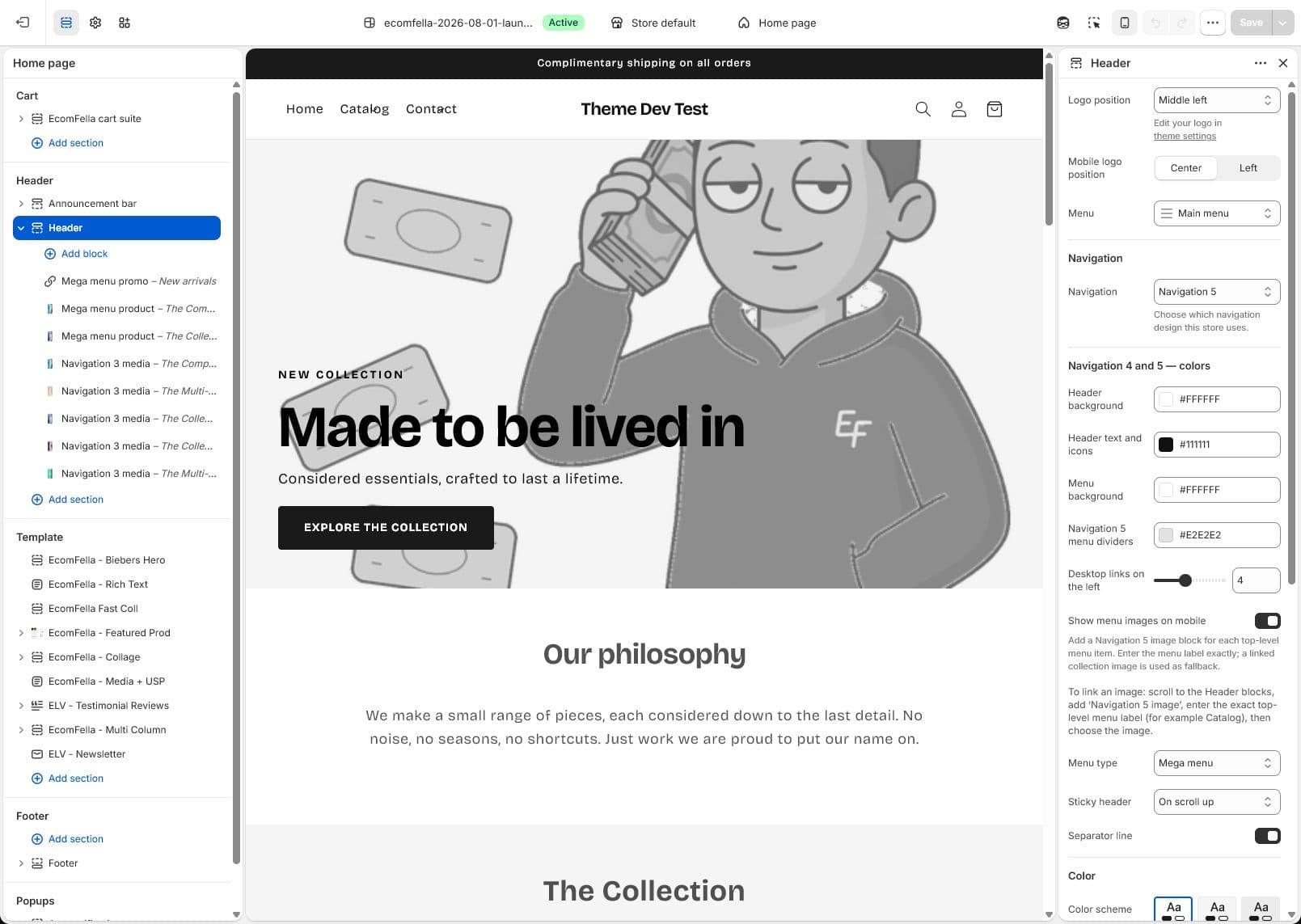
Read the Ecomfella theme overview, inspect the real product demo and use the package comparison to evaluate the remaining work. One licensed Shopify store per store seat. Upload the delivered ZIP as an unpublished Shopify theme. Review before publishing it yourself.
Questions before you decide
Will every old section move automatically?
No. Different themes have different schemas and supported blocks. Plan a controlled rebuild and verify each template.
Does this require an Ecomfella Shopify app?
No automatic Ecomfella app installation is claimed. The current theme workflow uses a delivered ZIP and Shopify’s Theme Editor.
Bring this checklist to the theme.
See the real layouts and controls before deciding whether they fit your products. No theme purchase or delivery is enabled in this Preview.
Explore the real themeSources and review
Primary provider documentation reviewed on 2026-09-13. Features and policies can change; confirm the selected release and current provider terms. The Ecomfella media comes from the existing unpublished marketing-showcase evidence library.
Continue with the next question
Use Shopify metafields to give each product its own answer.
All storefront guides and tools